> For the complete documentation index, see [llms.txt](https://manuals.i-reporter.jp/llms.txt). Markdown versions of documentation pages are available by appending `.md` to page URLs; this page is available as [Markdown](https://manuals.i-reporter.jp/clustertype_settingprocedure/various-settings/normal-minimum-normal-maximum.md).
# 正常最小値/正常最大値の設定と表示
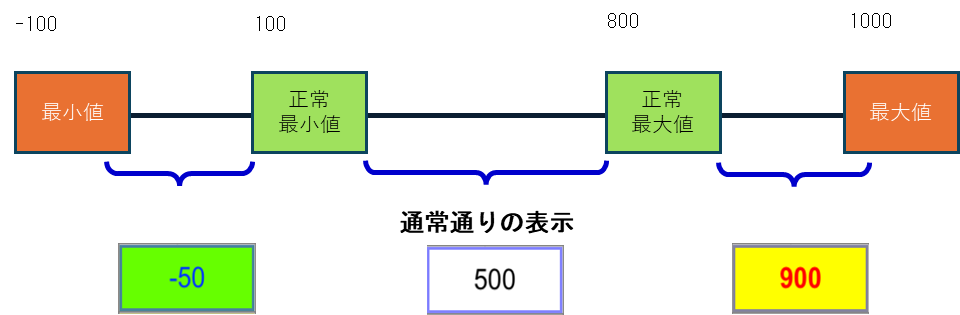
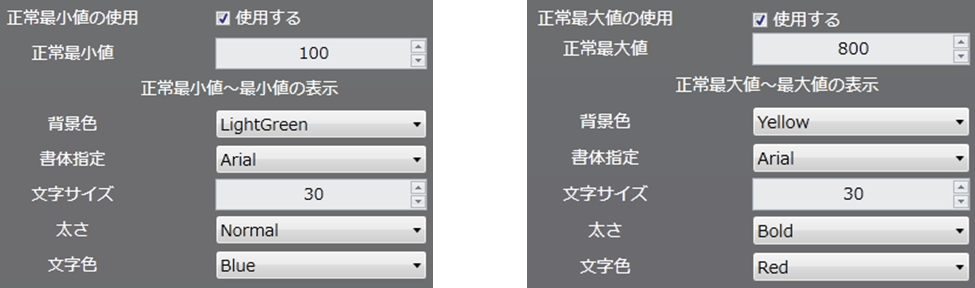
最小値、最大値に加えて「しきい値」として正常最小値、正常最大値を設定すると、正常最小値に満たない数値、正常最大値を超える数値が入力された場合、それぞれ設定された形式でアプリ上で通常時とは異なる表示を行うことができます。
異常値を表現することができます。
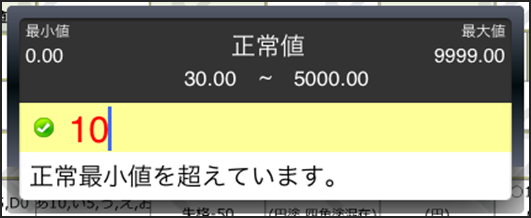
正常最小値/正常最大値範囲外メッセージを設定しておく事で、正常範囲外の値が入力された場合に、アプリ上に指定したメッセージを表示させることができます。メッセージは最大5行、全角100字まで指定することができます。
「範囲外メッセージを表示する」にチェックを付けていない場合は、標準メッセージが表示されます。
【標準メッセージ】\
「正常最小値(正常最大値)を超えています。」
---
# Agent Instructions
This documentation is published with GitBook. GitBook is the documentation platform designed so that both humans and AI agents can read, navigate, and reason over technical content effectively. Learn more at gitbook.com.
## Querying This Documentation
If you need additional information that is not directly available in this page, you can query the documentation dynamically by asking a question.
Perform an HTTP GET request on the current page URL with the `ask` query parameter, and the optional `goal` query parameter:
```
GET https://manuals.i-reporter.jp/clustertype_settingprocedure/various-settings/normal-minimum-normal-maximum.md?ask=&goal=
```
`ask` is the immediate question: it should be specific, self-contained, and written in natural language.
`goal` is optional and describes the broader end goal you are ultimately trying to accomplish on behalf of the user. GitBook uses it to tailor the answer towards what is most useful for that goal.
The response will contain a direct answer to the question and relevant excerpts and sources from the documentation.
Use this mechanism when the answer is not explicitly present in the current page, you need clarification or additional context, or you want to retrieve related documentation sections.